v0.2.12 is outfree and open source, MIT

God mode for your terminals.

Every agent. Every account. One command center. GodTerm runs Claude Code, Grok Build, Codex, Cursor, Antigravity and OpenCode side by side, shows how much each account has left, and lets you drive all of them by voice or a click.

Universal DMG, signed and notarizedOther platformsRelease notes

curl -fsSL https://godterm.com/install.sh | sh

Overview

Every account, one screen

One window for every coding agent you run.

Each pane is one account, signed in with its own Claude Code subscription, Grok Build login or another agent CLI, with as many tabs as you like. Every tab is the real agent CLI in its own terminal, nothing re-implemented. Auto grid, columns, rows or focus, and zoom any pane.

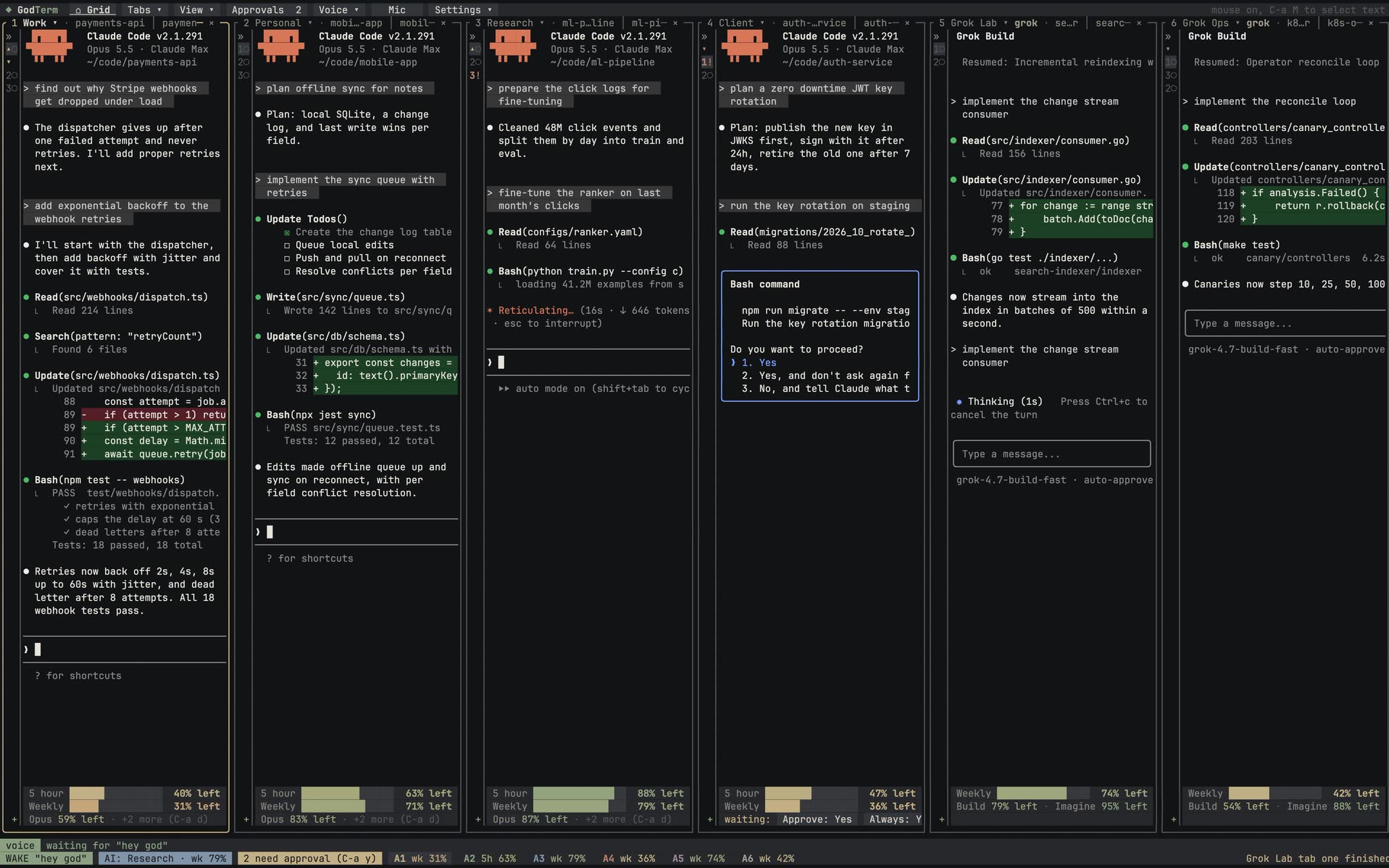
GodTerm with six accounts side by side: four Claude Code panes and two Grok Build panes, each with its 5 hour and weekly usage underneath.

Never hit a wall

See every limit. Keep working when one runs out.

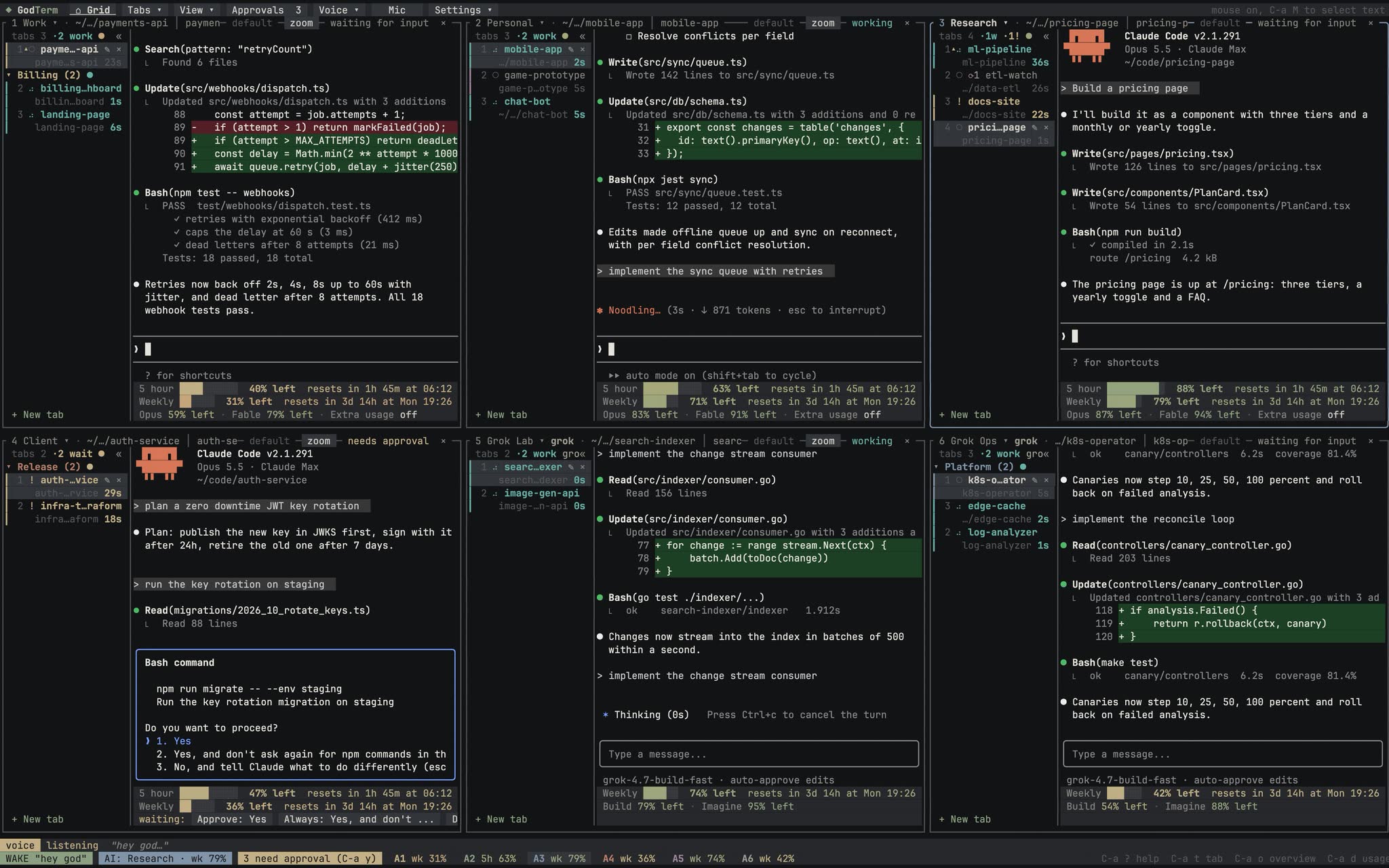
Under every pane: the 5 hour and weekly limits left, with reset countdowns. When an account runs low, GodTerm moves the live conversation to the account with the most left, resumes it there, and only then closes the original.

A six pane GodTerm grid with tab groups on the left of each pane and usage bars under every account.

Talk to your terminal

Say it. It happens.

Say "hey god" or type what you want. The assistant reads every tab's state, talks to your agents for you, and acts with GodTerm's own tools. Batch actions turn into one exact plan and one yes. Speech runs on your machine by default.

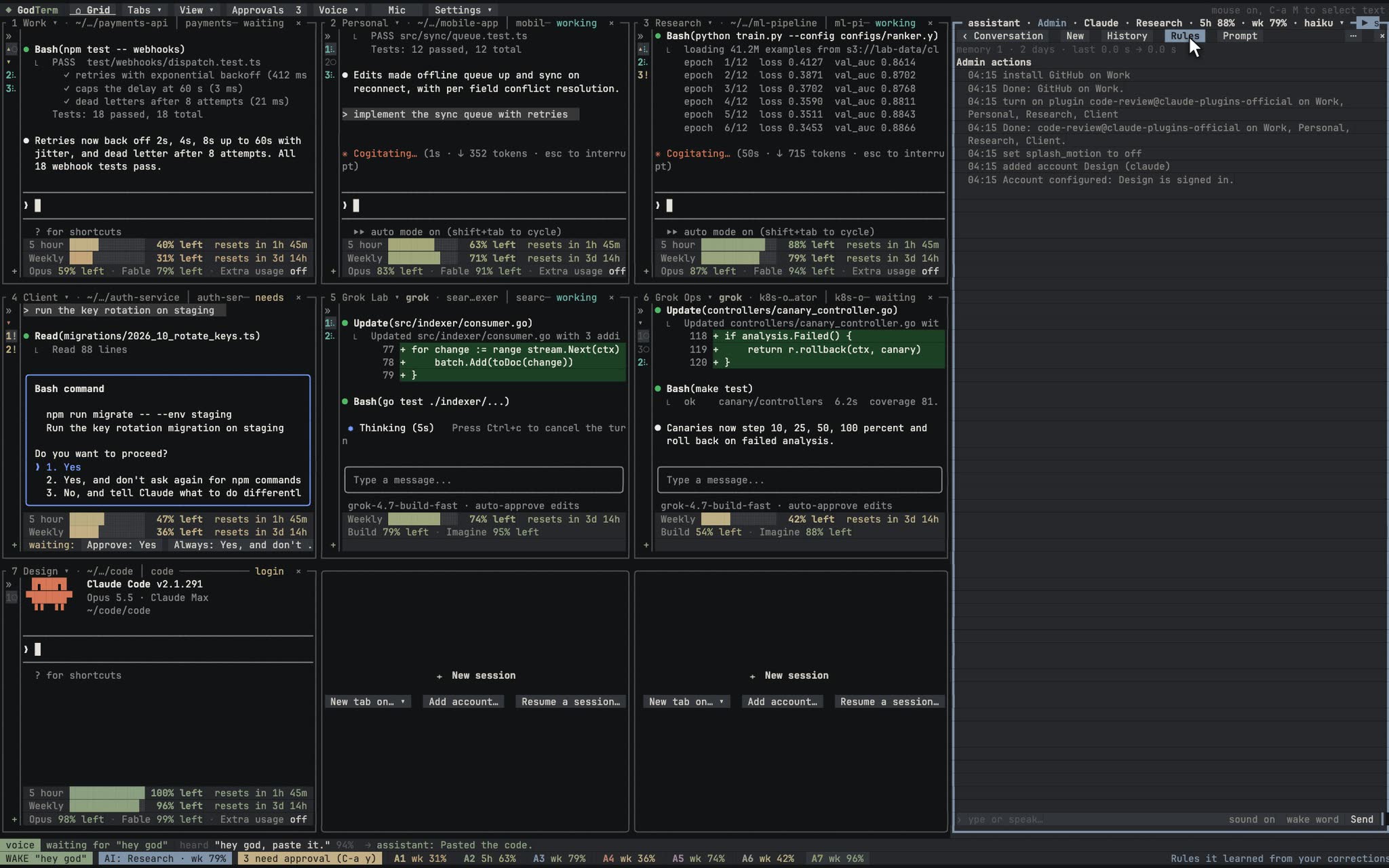
The GodTerm assistant panel docked beside the grid, listing the admin actions it just ran.

Works with

Every agent CLI you use.

Each tab runs the real CLI. GodTerm reads when it is working, waiting or asking, puts every approval in one queue, and gives each tab its own browser.

  • Claude Code
  • Grok Build
  • Codex
  • Cursor
  • Antigravity
  • OpenCode

The films

See it run. In one minute.

Recorded from the real app. Start with the highlights, then pick any of the eleven short films below.

The highlights · 1:03
  • Unlimitedaccounts, each fully isolated
  • 5h + weeklylimits live, per account
  • Local voiceby default, Grok voices optional
  • ~0.5 GBfreed per idle tab the memory saver pauses

Eleven short films

A feature tour, one film at a time.

  1. Every account, one screen

    Claude Code and Grok Build, every account, side by side.

    • Claude Code and Grok Build accounts side by side
    • Auto, grid, columns, rows and focus layouts
    • Zoom one pane, split an account in two
    • Each pane keeps its own tabs
  2. Talk to your terminal

    Say hey god. It answers, and gets things done.

    • Wake word, push to talk or open mic
    • The assistant answers out loud and runs things hands-free
    • Whisper and Kokoro run on your Mac
    • Or use Grok voice
  3. The operator

    Your assistant talks to your tabs, so you don't have to.

    • Sends prompts to any tab, on any account
    • Waits for the reply and tells you
    • Answers back and follows up
    • One Yes/No question before batch actions
  4. Never hit a wall

    See every limit, and keep working when one runs out.

    • Live 5-hour and weekly limits for every account
    • Warns before an account runs out
    • Moves the session to the account with the most left
    • The conversation keeps going
  5. Admin by voice

    MCP servers, plugins, settings and accounts, by asking.

    • Install MCP servers and plugins on any account
    • Change settings by name
    • Add an account with a guided login
    • Every change shown first, one yes, logged in Admin
  6. Every session, found

    Every conversation on your Mac, one search away.

    • Every Claude Code and Grok session on this Mac, from every account
    • Take over a session running in another terminal
    • Search every past conversation, open it in a tab
    • Reopen closed tabs, full tab history
  7. Tabs your way

    Groups, pins and colors, on every account.

    • Tab groups that fold away
    • Pin the tabs you live in
    • Accent colors per tab and group
    • Drag a tab into a group, move it to another account
  8. Claude or Grok

    Run Claude and Grok together. Switch the assistant anytime.

    • Claude Code and Grok Build accounts side by side
    • Switch the assistant between Claude and Grok, conversation kept
    • The Grok assistant uses its own login
    • Remote Control from claude.ai or the Claude app
  9. Built to stay fresh

    One line to install. Signed updates from then on.

    • One-line install on macOS and Linux, Homebrew, or the Windows installer
    • Setup installs Claude Code, Grok Build and the voice pack
    • Signature-checked updates, a quiet chip when one is ready
    • What's new, right in the app
  10. Little things that matter

    Selection, approvals, loops and a panel that docks or floats.

    • Select text in a pane: drag, double or triple click, copied on release
    • One approvals queue for every account
    • Every loop at a glance
    • The assistant panel docks or floats
  11. Every agent CLI

    Claude Code, Grok Build, Codex, Cursor, Antigravity and OpenCode, side by side.

    • Claude Code, Grok Build, Codex, Cursor, Antigravity and OpenCode side by side
    • Working, waiting and approvals read off each CLI's own screen
    • One approvals queue, with the keys each CLI expects
    • A Browser button per tab: its own Chrome profile

Features

Everything in one command center.

Accounts and sessions, side by side

As many Claude Code accounts as you have, each in its own isolated config and keychain login, with any number of tabs per account. Layouts: auto grid, fixed grid, columns, rows, or focus. Panes page when they don't fit, and you drag borders to resize.

Usage at a glance

Under every pane: the 5 hour and weekly limits left, colored on a gradient, with reset countdowns. The dashboard lists every bucket. Set the assistant to "best", or ask for "the best account", and it picks the one with the most left.

Move a live conversation

Account running low? Double click the tab. The picker sorts your other accounts by 5 hour quota left, copies the session over, resumes it there, and only then closes the original. Undo for 10 seconds.

Voice, local by default

Push to talk, a "hey god" wake word, or open mic. By default whisper.cpp (or Apple's on-device recognizer) transcribes on your machine and Kokoro talks back. Grok's speech recognition and 28 voices are an option. A speaker lock trained on your voice keeps background voices out.

An assistant that runs everything

Say or type what you want: "open a tab on the account with the most left and build a calculator". It reads every tab's state and acts with GodTerm's own tools. Batches of destructive actions resolve to one exact plan and one question. With Remote Control on, you can drive it from claude.ai or the Claude app.

Approvals queue

Every tab waiting for permission, across all accounts, longest first, with what it wants: the command, the file, the folder. Approve, always allow, deny or jump. Bypass or any permission mode per account, plus automatic folder trust.

Sessions browser

Past sessions from every account and from your main ~/.claude, searchable, with token totals. Copy or move sessions between accounts, with checks and undo, then resume one in a tab.

Every agent CLI

Any account can run Grok Build, Codex, Cursor, Antigravity or OpenCode instead of Claude Code. Grok Build gets its own isolated home, login, weekly credits and sessions. The others keep their own logins, and GodTerm reads when each is working, waiting or asking, so their approvals land in the same queue. Every tab also gets a Browser button for its own Chrome profile.

Built for long days

A loops view for scheduled prompts, a memory saver that pauses idle background tabs, a full settings screen, a command palette, privacy mode for screen sharing, and window position memory. Everything is clickable.

Install

Get GodTerm v0.2.12.

Free and open source under the MIT license. Every build is on the GitHub release page with SHA256SUMS. GodTerm runs the Claude Code CLI (claude); Settings > Setup installs it if it is missing.

Terminal
curl -fsSL https://godterm.com/install.sh | sh

macOS and Linux: checks the SHA-256, installs to ~/.local/bin, no sudo

macOS 12 or later, Apple silicon and Intel. Open the DMG and drag GodTerm to Applications. It is signed with a Developer ID and notarized by Apple, so it opens without a Gatekeeper warning.

Or install just the command with the script (it checks the SHA-256 and installs to ~/.local/bin, no sudo):

curl -fsSL https://godterm.com/install.sh | sh

With the app installed, link its command instead:

ln -sf /Applications/GodTerm.app/Contents/MacOS/godterm ~/.local/bin/godterm
  1. 1

    Install

    Download the app for macOS, Linux or Windows, or brew install it. It runs the Claude Code CLI (claude); if that is missing, Settings > Setup installs it for you.

  2. 2

    Log in your accounts

    The first run asks how many accounts you want. Each pane shows the agent's own login; sign in once per account and the banner moves to the next.

  3. 3

    Talk or click

    Click anything, use Ctrl-a keys, or say "hey god" and ask. The assistant handles the rest across every account.

FAQ

Questions, answered.

Does my voice leave my computer?

Not in the default local mode. Speech recognition runs on your machine with whisper.cpp (or Apple's on-device recognizer on macOS), and replies are spoken by Kokoro or macOS say. The only network traffic is the assistant's requests: what you asked, as text, goes to Claude on the account you chose for the assistant.

If you choose Grok for speech recognition, each utterance's audio is sent to xAI. It's sent only after GodTerm's local checks: once you've trained the speaker lock on your voice, it and the distance gate drop background voices on your machine, so those never leave it. Live partial transcripts still come from the local recognizer. If you choose Grok talk-back, the text of each spoken reply is sent to xAI.

Can I use Grok's voices?

Yes, as an option. In Settings > Voice and Audio you can pick xAI Grok for speech recognition, for talk-back (28 voices), or both, and mix it with the local engines, for example local recognition with Grok talk-back. It signs in with an existing grok login (Grok Build) or an xAI API key kept in the macOS Keychain, never in the config file. It uses that login's Grok voice credits, which Settings shows per login. If Grok fails, is slow or runs out of credits, GodTerm falls back to the local engines you have installed.

How are my accounts kept apart?

Every account gets its own config folder, so its settings, transcripts and login are separate from the others and from your normal ~/.claude. Logins are stored by Claude Code itself in the macOS Keychain. GodTerm only reads an account's token to fetch its usage, never touches your default login, and never logs tokens.

Which agents are supported?

Claude Code with subscription logins, Grok Build, Codex, Cursor, Antigravity and OpenCode. Each tab runs the real CLI. Usage limits, sessions and account moves are built in for Claude Code and Grok Build; the other CLIs manage their own logins and usage, and GodTerm reads their screens for working, waiting and approvals. The assistant itself runs on one of your Claude Code accounts, or on Grok.

Will the assistant do something destructive without asking?

Batch and destructive actions (closing tabs, stopping loops, sending one prompt to many tabs, denying, approving things like rm or git push) turn into one exact plan and one question. Your yes runs exactly that set. It has no tool to change permission modes, logins or settings.

How heavy is it?

GodTerm itself is a native Rust app with little overhead. Most memory goes to the agent processes it runs (each claude takes about 530 MB). The memory saver pauses idle background tabs, freeing that memory, and resumes the same conversation when you open the tab again.

What does it need?

The agent CLIs you use, with Claude Code (claude) required. Voice also needs ffmpeg, whisper.cpp and a model; Kokoro talk-back needs espeak-ng and its model files. Settings > Setup shows what is missing and installs it for you (or say "install the voice pack"); godterm doctor prints the same plan.

How do I install it?

Download it from the install section or the GitHub release page: a DMG for macOS, .deb, .rpm, AppImage or tar.gz for Linux, and an installer or zip for Windows. With Homebrew: brew install --cask daniel-farina/godterm/godterm.

How do updates work?

Starting with 0.2.2, GodTerm updates itself. It checks GitHub Releases when it starts and every 6 hours, and downloads the update for your platform in the background. Before anything is used, it checks the download's SHA-256 against the release's SHA256SUMS and, on macOS, the Developer ID signature plus a Gatekeeper check of the app. Releases are signed (SHA256SUMS.minisig, on every release from 0.2.2) and from 0.2.4 GodTerm requires that signature: a release without a valid one is never installed (the update check still shows it). You can turn this off with require_signature = false under [update], which is not recommended.

When the update is ready, choose Restart to update (or press Ctrl-a N): your tabs come back in the new version, and godterm update --rollback can go back. Homebrew, apt and dnf installs are never changed by GodTerm; update them with your package manager, for example brew upgrade godterm. Versions 0.2.0 and 0.2.1 have no updater, so update those once by hand.

Does GodTerm collect any data?

Only two anonymous counts, so we know how many people install it. After a successful install, install.sh sends one ping with your OS, CPU architecture and the GodTerm version (for example macos, arm64, 0.2.6). The download buttons on this site send the file name when clicked. That is all: no IP address, cookie, ID or anything personal is stored, only daily totals, and there are no third-party trackers on this site. The GodTerm app itself has no telemetry.

To skip the install count, run curl -fsSL https://godterm.com/install.sh | GODTERM_NO_TELEMETRY=1 sh (DO_NOT_TRACK=1 works too). The download count is skipped when your browser sends Do Not Track or Global Privacy Control.

Is it really free? What's the license?

Yes. GodTerm is open source under the MIT license, and the code is on GitHub. You use your own subscriptions for the agents you run.

Windows warns me about the installer. Is that expected?

Yes. The Windows build isn't code signed yet, so SmartScreen may say "Windows protected your PC". Click More info, then Run anyway. To be sure you have the real file, compare it with SHA256SUMS on the release page.
The GodTerm app icon

Every agent. Every account.
One command center.

v0.2.12 · free and open source (MIT)